


Download Yapbam – Free Personal Bank Account Manager for Windows, Mac, Android & iOS
Looking for a secure, lightweight, and free personal finance tool? Yapbam (Yet Another Personal Bank Manager) is a powerful, open-source software designed to help individuals and small businesses manage multiple bank accounts, track income and expenses, and maintain a clear budget overview. Developed by fahtzer, Yapbam offers a clean, intuitive interface that makes managing your finances simple and efficient.
Whether you're on Windows, Mac, Android, or iOS, Yapbam ensures seamless access to your financial data. With features like transaction importing, budget tracking, automated balance history, and a built-in currency converter tied to the European Central Bank, this app stands out as a reliable choice for personal finance management. Despite a few limitations—such as no file attachments and limited export format support—Yapbam remains a solid, free alternative to paid financial software.
Download Yapbam today and take full control of your money with a tool that’s both powerful and easy to use.
Key Features of Yapbam – What Makes It Stand Out?
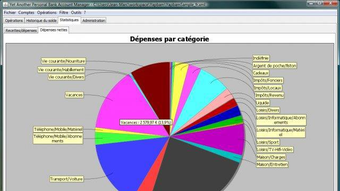
Yapbam is packed with essential tools that make personal finance management both efficient and insightful. One of its standout features is the booking wizard, a smart assistant that guides users through transaction entry, reducing errors and saving time. Whether you're logging a monthly utility bill or recording a freelance payment, the wizard helps categorize and schedule entries with minimal effort. The app automatically updates your account balance and maintains a detailed history, allowing you to visualize your financial journey over time. This historical data is crucial for identifying spending patterns and adjusting your budget accordingly. Another powerful feature is the budget overview and expense graphs. Yapbam generates visual reports that break down your spending by category, helping you spot areas where you might be overspending. These graphs are not just decorative—they offer actionable insights. For example, if you notice a spike in dining expenses, you can adjust your habits early. The app also supports multi-currency tracking via an integrated currency converter that pulls real-time rates from the European Central Bank, making it ideal for users managing finances across borders. Importing data from other platforms is another major plus. Yapbam allows users to import transaction data from previous account managers, CSV files, or even online bank statements. This feature eliminates the need for manual data entry, which is a huge time-saver. Additionally, the app supports customizable account settings, so you can tailor the interface to your preferences. While Yapbam lacks advanced reporting or file attachment features, its core functionality is robust and well-executed. With no ads and a free license, it’s an excellent choice for anyone seeking a secure, lightweight, and privacy-focused finance tool.How to Install and Use Yapbam on Windows, Mac, Android, and iOS
Getting started with Yapbam is straightforward across all major platforms. For Windows and Mac users, visit the official website and download the appropriate installer for your system. The setup process is quick and requires no special configuration—just run the installer, launch the app, and follow the on-screen prompts. Once installed, you’ll be prompted to create your first account by entering a name and initial balance. From there, Yapbam automatically begins tracking your financial activity. On Android and iOS, Yapbam is available through the Google Play Store and Apple App Store. Search for “Yapbam” in the app store, download the free version, and sign up with your preferred account details. The mobile app syncs seamlessly with your desktop version, allowing you to manage your finances on the go. The interface is responsive and optimized for touch, making it easy to add transactions, view graphs, and check your balance from your smartphone. Using Yapbam involves three main steps: account setup, transaction logging, and budget review. After creating your account, start entering transactions using the booking wizard. You can categorize each entry (e.g., groceries, rent, salary) and set recurring payments. The app will then generate a real-time balance and historical chart. To maximize its potential, review your budget weekly and adjust your spending habits based on the visual reports. The app also sends alerts when your balance goes negative, helping you avoid overdrafts.Compatibility and System Requirements
Yapbam is designed to be highly accessible, supporting a wide range of operating systems and devices. The software is compatible with Windows 7 and later, including Windows 10 and Windows 11, ensuring broad usability across desktop environments. For Mac users, Yapbam runs smoothly on macOS 10.12 (Sierra) and newer, including the latest Apple Silicon (M1/M2) models. This cross-platform support makes it ideal for users who switch between devices or work in mixed IT environments. Mobile users can enjoy Yapbam on both Android 5.0 (Lollipop) and later, as well as iOS 11 and above. The mobile app is lightweight, consumes minimal battery, and functions offline, allowing you to log transactions even without an internet connection. All data is stored locally by default, enhancing security and privacy. While the app supports cloud sync for cross-device access, users can also choose to keep their data on-device for maximum control. The system requirements are modest, making Yapbam suitable for older or low-spec machines. It typically uses less than 100 MB of RAM and requires minimal disk space—ideal for users with limited storage. The software does not require administrator rights during installation, making it easy to deploy in shared or restricted environments. Whether you're managing personal finances at home or tracking small business expenses, Yapbam delivers consistent performance across all platforms.Pros and Cons of Using Yapbam
- Pros:
- Completely free and open-source with no ads
- Lightweight and fast, even on older devices
- Supports multi-currency with real-time ECB rates
- Easy-to-use interface with customizable layout
- Import transactions from CSV, bank statements, or other managers
- Automated budget overview and visual expense graphs
- Booking wizard speeds up transaction entry
- Offline functionality on mobile and desktop
- Cons:
- No file attachment support for transactions
- Export formats require manual configuration (no clear documentation)
- Limited reporting and analytics compared to premium tools
- No built-in issue reporting or customer support
- Interface lacks advanced customization options
Final Verdict: Is Yapbam Worth Downloading?
Yapbam is a reliable, secure, and lightweight personal finance manager that excels in simplicity and core functionality. While it may not offer the bells and whistles of enterprise-grade software, it delivers everything you need for effective personal or small business budgeting. Its ability to import data from other platforms, generate insightful graphs, and track multiple accounts makes it a standout choice for users who value privacy and control. The lack of file attachments and limited export options are notable drawbacks, but they don’t overshadow its strengths.
If you’re looking for a free, secure, and easy-to-use finance tool that works across Windows, Mac, Android, and iOS, Yapbam is definitely worth a try. Download it today and take the first step toward smarter financial management.
Frequently Asked Questions (FAQ)
-
Can I import my bank statements into Yapbam?
Yes. Yapbam supports importing transaction data from CSV files and online bank statements, eliminating the need for manual entry.
-
Is Yapbam available for mobile devices?
Yes. You can download Yapbam for both Android and iOS from their respective app stores.
-
Does Yapbam support multiple currencies?
Yes. The app includes a built-in currency converter that uses real-time rates from the European Central Bank.
-
Can I use Yapbam without an internet connection?
Yes. The desktop and mobile versions work offline, allowing you to log transactions anytime.
-
Is there customer support or a help center?
Not officially. Yapbam does not have a formal support system or issue reporting feature, but the open-source community provides some guidance.
Can I import my bank statements into Yapbam?
Yes. Yapbam supports importing transaction data from CSV files and online bank statements, eliminating the need for manual entry.
Is Yapbam available for mobile devices?
Yes. You can download Yapbam for both Android and iOS from their respective app stores.
Does Yapbam support multiple currencies?
Yes. The app includes a built-in currency converter that uses real-time rates from the European Central Bank.
Can I use Yapbam without an internet connection?
Yes. The desktop and mobile versions work offline, allowing you to log transactions anytime.
Is there customer support or a help center?
Not officially. Yapbam does not have a formal support system or issue reporting feature, but the open-source community provides some guidance.







